MSME Digital Tools Guide: Simplify Your Business Growth
MSME digital tools guide helps your micro, small, or medium enterprise (MSME) thrive. If you’ve registered, you’re set. Now, use this guide to pick tools and grow. It covers easy software options and tips. Let’s make your business stronger together!
Table of Contents
Building a Solid MSME Base with Digital Tools
Welcome to the exciting world of managing and growing your micro, small, or medium enterprise (MSME)! If you’ve successfully registered your business, you’re already on the right path. Now, it’s time to elevate your operations with the right tools and legal strategies. This page, Business Tools & Legal Setup, is your comprehensive guide to mastering the essentials that will transform your business into a thriving entity. We’ll dive deep into MSME digital tools Guide, trademark registration, patent protection, and free resources—each section packed with practical advice, real-world insights, and actionable steps. Whether you’re a beginner or looking to refine your approach, this guide is crafted to empower you with knowledge and confidence. Let’s embark on this journey together and unlock your business’s full potential!
MSME Digital Tools and Software
Overview: Why an MSME Digital Tools Guide Boosts Efficiency
Spending Hours on expense tracking? Running MSME can feel like a whirlwind of tasks—tracking finances, managing customers, and planning projects all at once. But what if you had a trusty sidekick to handle the heavy lifting? That’s where MSME digital tools and software come into play. These are specialized applications designed to streamline your daily operations, save you time, and boost efficiency. For a new entrepreneur, the idea of adopting technology might seem daunting, but it’s a game-changer that levels the playing field. In this section, we’ll explore what these tools are, why they matter, the best options available, how to implement them, and how they can revolutionize your business. Get ready for a deep dive into the world of digital empowerment!
Why Digital Tools Are Essential for Your MSME
Imagine spending hours manually calculating your expenses or chasing down customer details—exhausting, right? Digital tools eliminate that stress by automating routine tasks. They’re not just luxuries; they’re necessities that help you focus on growing your business. For instance, accounting software can handle your books in minutes, while customer relationship management (CRM) tools keep your client data organized. This efficiency translates into cost savings—many tools offer free tiers or affordable plans tailored for small businesses. Plus, using professional software gives your MSME a polished image, making it easier to win trust from clients, partners, and even banks when you need a loan. The bottom line? These tools are your secret weapon to work smarter, not harder.
“The right tool can turn chaos into order—my friend Anita went from a chaotic order book to a streamlined schedule with just one app!” – A successful MSME owner”
Top MSME Digital Tools Guide for Easy Adoption
Meet top tools in your MSME digital tools guide. Each designed to tackle specific challenges faced by MSMEs. Here’s a detailed look at the top contenders:
- Tally: Often called the backbone of small business accounting, Tally is a robust solution for managing finances, invoicing, and GST compliance. It’s widely used across India and offers features like real-time reporting and inventory tracking. The basic version starts at ₹600 per month, with a new mobile app launched in 2025 that lets you check your finances on the go—perfect for busy owners!
- Zoho CRM: This is your customer management hero. Zoho CRM helps you track leads, manage sales, and build customer relationships with ease. It includes a free tier for up to three users, making it ideal for startups, with paid plans starting at ₹300 per month for more features like automation and analytics.
- Trello: If organization is your goal, Trello is a dream come true. This project management tool uses boards, lists, and cards to plan tasks, assign team roles, and monitor progress. The free version is generous, covering basic needs, while paid options unlock advanced features—great for growing teams.
- Google Workspace: For professional communication and collaboration, Google Workspace offers email (with your domain), document editing, and cloud storage. Priced at ₹125 per user per month, it’s a cost-effective way to look big, even if you’re just starting out.
Each tool brings something unique to the table. Tally is for financial control, Zoho CRM builds customer loyalty, Trello keeps projects on track, and Google Workspace polishes your professional presence. The key is to start with one that matches your biggest need—say, accounting if you’re struggling with cash flow.
How to Implement Digital Tools in Your MSME
Adopting new technology might sound tricky, but I’ll guide you through it like a friend showing you the ropes. Here’s a step-by-step process to get started:
- Identify Your Need: Take a moment to think about your biggest challenge. Is it managing money? Tracking customers? Planning work? Pick the area where you need the most help. For example, if invoices are piling up, Tally might be your first pick.
- Choose Your Tool: Visit the website of your chosen tool—tallysolutions.com for Tally, zoho.com for Zoho CRM, trello.com for Trello, or workspace.google.com for Google Workspace. Browse their features and pricing. Most offer free trials, so you can test before committing.
- Set Up Your Account: Sign up with your email and follow the setup wizard. These sites usually have a simple form asking for basic details like your business name. Don’t worry if you’re new—there’s always a “Get Started” button to guide you.
- Customize and Learn: Tailor the tool to your needs. For Tally, input your income and expenses; for Trello, create a board for your projects. Watch their free tutorials—often just 10-15 minutes—to get the hang of it. Anita, for instance, watched a Trello video and set up her first board in an afternoon.
- Start Small and Scale: Use it for a week on a small task—like tracking one week’s sales. If it works, expand its use. If not, try another tool. There’s no rush—find what feels right for you.
Real-World Success Stories
Let’s draw inspiration from real MSME owners who’ve thrived with these tools. Anita, a tailor from Delhi, struggled with order chaos until she adopted Trello. She created boards for “Pending,” “In Progress,” and “Done,” assigning tasks to her team. Within a month, her delivery time halved, and customers raved about her reliability. Then there’s Raj, a small trader, who used Zoho CRM to track his wholesale clients. He spotted a repeat buyer trend, offered a discount, and boosted sales by 20%. These stories show how the right tool can turn challenges into opportunities—your turn is next!
The Future of MSME Tools
The digital landscape is evolving, and 2025 brings exciting trends. Expect more AI features—like Tally predicting cash flow—or mobile-first designs, making tools accessible anywhere. Stay updated by visiting tool websites regularly or joining MSME forums. Your investment in these tools today will pay off as they grow with your business.
Conclusion: Take the First Step Today
Digital tools are your bridge to a smoother, more successful MSME. From Tally’s financial mastery to Trello’s project magic, you’ve got options to fit any need. Start with one tool, follow the steps, and watch your business transform. Visit tallysolutions.com, zoho.com, trello.com, or workspace.google.com to begin. Your journey to efficiency starts now—let’s make it happen!
Advanced Features and Customization
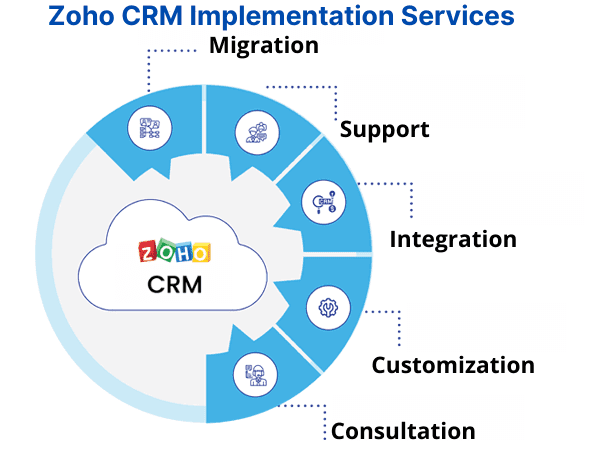
With Tally, you can create custom reports to track seasonal sales—a lifesaver for retailers. Zoho CRM lets you design custom dashboards to monitor key clients, while Trello’s “Automation” feature auto-moves tasks when done. Google Workspace’s shared drives can organize files by project—try labeling folders like “2025 Plans.” Spend an afternoon experimenting—most tools offer a sandbox mode to play without risk. This hands-on approach builds your confidence and tailors the tool to your unique business.
Advanced Features and Customization
With Tally, you can create custom reports to track seasonal sales—a lifesaver for retailers. Zoho CRM lets you design custom dashboards to monitor key clients, while Trello’s “Automation” feature auto-moves tasks when done. Google Workspace’s shared drives can organize files by project—try labeling folders like “2025 Plans.” Spend an afternoon experimenting—most tools offer a sandbox mode to play without risk. This hands-on approach builds your confidence and tailors the tool to your unique business.
Integrating Tools for Maximum Impact
Why use one tool when you can combine them? Link Tally with Zoho CRM to sync invoices and customer data, creating a seamless flow. Connect Trello to Google Workspace to attach Docs to tasks. These integrations, supported by APIs (check each site’s developer page), require a bit of setup but save hours. Start small—link two tools—and scale as you learn. A bakery owner I know uses this combo to track orders and finances in one glance—pure genius!

Training and Support Options
Don’t feel left behind—training is at your fingertips. Tally offers free webinars on tallysolutions.com, while Zoho has a “Zoho University” with video courses. Trello’s blog has step-by-step guides, and Google Workspace provides free YouTube tutorials. Join local MSME groups or online communities to swap tips. If stuck, their support teams—accessible via chat or email—are there to help, often within hours.
Troubleshooting and Maintenance
Every tool has quirks. If Tally crashes, clear the cache or reinstall—support can guide you. Zoho CRM might lag with large data; export and re-import to fix it. Trello’s sync issues resolve with a logout-login cycle. Regular updates (check monthly) keep tools running smoothly. Backup data weekly using export options—peace of mind is worth it.
Long-Term Strategy with Digital Tools
Think of these tools as partners for growth. As your MSME scales, upgrade to paid plans for advanced features—like Tally’s multi-user mode or Zoho’s analytics. Train a team member to manage them, ensuring continuity. Revisit your needs yearly to swap or add tools—flexibility is key. Your digital toolkit will evolve with you, supporting every milestone.
Community and Networking
Joining a community amplifies your tool use. MSME forums on Facebook or LinkedIn offer peer advice—ask about Trello hacks! Local business meets often host tool demos. Share your progress—others might share theirs, creating a support network. This connection fuels innovation and keeps you motivated.
Final Thoughts: Embrace the Digital Edge
MSME digital tools and software are your gateway to efficiency and growth. From Tally’s financial precision to Trello’s organizational flair, each offers a piece of the puzzle. Start today—visit their websites, set up one tool, and watch your business soar. You’ve got this—let’s build a future-proof MSME together!

MSME registration guide
Start your business with our MSME registration guide. Learn Udyam registration process, eligibility, required documents, government portal steps and certificate benefits—perfect for startups, artisans and local service businesses across India.
MSME documents checklist
Get a complete MSME documents checklist for Udyam, GST, PAN, Aadhaar, bank statement, incorporation certificate and digital signature. Designed for proprietorship, partnership, LLP and private limited startups registering their small business in India.
Free business tools for MSME
Explore the best free business tools for MSME—CRM, invoicing software, GST billing, inventory apps, logo makers, domain search and website builders. Reduce startup costs and boost efficiency with tools tailored for small businesses in India.

MSME registration checklist
Follow our post MSME registration checklist to open current accounts, apply for GST, set up bookkeeping, issue invoices, register trademarks and meet compliance deadlines. A practical startup guide for MSMEs after completing Udyam registration.

MSME legal compliance
Understand MSME legal compliance —licenses, labour law, shop and establishment act, contracts, NDAs, privacy policy, and tax obligations. Our legal guide simplifies rules for startups, partnerships and small businesses navigating compliance challenges.
Trademark registration for MSME
Protect your brand with our trademark registration for MSME guide. Learn classes, search, TM-A filing, fees, objections and brand protection strategies. Tailored for startups and small businesses securing their identity in India.

Patent registration for startups
Step-by-step patent registration for startups. Covers prior art search, provisional and complete filing, IPO forms, fee reductions for MSMEs, timelines, design vs patent and innovation protection—perfect for entrepreneurs and inventors.
Government schemes for MSME
Unlock government schemes for MSME—SIDBI, NSIC, ZED certification, GeM, cluster development and subsidy programs. Learn eligibility, benefits, documents and application process with simple guidance tailored for Indian startups and small enterprises.

MSME loan guide
Compare options with our MSME loan guide —Mudra loans, collateral-free credit, NBFC lending, working capital, interest rates, CIBIL score, EMI calculation and required documents. Practical insights for small businesses applying for finance.

MSME subsidy guide
Save costs with our MSME subsidy guide . Learn capital subsidy, interest subvention, technology upgradation, ZED reimbursement, export incentives and state grants. Step-by-step application details for small business founders in India.

CGTMSE loan Eligibility Guide
Understand CGTMSE loan eligibility for collateral-free credit. Coverage limits, guarantee fees, bank process, documentation checklist, claim settlement and renewal explained clearly. Practical guidance for micro and small enterprises in India.
MSME, Startup Income Tax Guide
Simplify MSME startup income tax —presumptive taxation under 44AD/44ADA, ITR forms, deductions, TDS/TCS, audit limits, GST reconciliation and due dates. Designed for proprietors, partnerships, LLPs and private limited companies.
The Ethical Founder’s Software Guide
Let us do the heavy lifting. Our detailed guides and verified website links help you navigate the vast digital landscape for your MSME. We provide unbiased reviews and step-by-step guidance on the best productivity tools available. Make informed, ethical decisions to automate your workflow without the overwhelm.
AI Tools For MSME/Startup’s
Choosing the right software is crucial—it impacts your data, ethics, and budget. We don’t sell tools; we provide the ultimate curated guidance. Our detailed articles and verified website links help you navigate the digital landscape, from free AI productivity apps to essential MSME platforms